PARKING MADE EASY WITH SPOTTER
The AI-powered parking assistant designed to help students and faculty find real-time parking and promote sustainability.
ROLE:
LEAD UX DESIGNER

DURATION:
24-HOUR CHALLENGE

TEAM:
HACKATHON
2 DESIGNERS
2 RESEARCHERS

TOOLS:
FIGMA
FIGJAM
CANVA
getting started
Finding parking quicker
At SpartaHackX, my team and I challenged ourselves to create an interactive mobile app that could diminish the issues student and faculty/staff feel when parking on campus.
Existing solutions lack real-time enforcement alerts, predictive availability, and user-driven reporting, making it difficult to plan ahead.
Spotter solves this by providing AI-powered lot tracking, real-time enforcement notifications, and smart alternative suggestions, creating a faster, stress-free parking experience.
problem
How might we reduce the time and uncertainty students and faculty face when searching for parking on campus?
Campus parking is often frustrating and inefficient, with students, faculty, and staff wasting time searching for open spots, facing unexpected fines, and dealing with congestion.
solution
Real-Time Parking Availability
Through the collection of user-reported data and AI-powered recommendations, users are shown parking lots that are close by with available parking spots.
solution Features
Notification of Parking Enforcement Presence
The "Report" feature allows students to alert others when and where they see parking enforcement or if they've received a ticket.
Spotter uses this data to give AI recommendations of where ticketing may be highest throughout the day.
Visualizing & empathizing with our users
User Personas
After conducting an in-depth assessment of our user base, we created three user archetypes. Each archetype represents a distinct user group, highlighting their key characteristics, goals, needs, and potential challenges.


Competitive Analysis
To gain an understanding of what solutions already exist, we conducted a competitive analysis of 4 parking applications, taking note of our immediate impressions, navigation experience, and their interactivity.
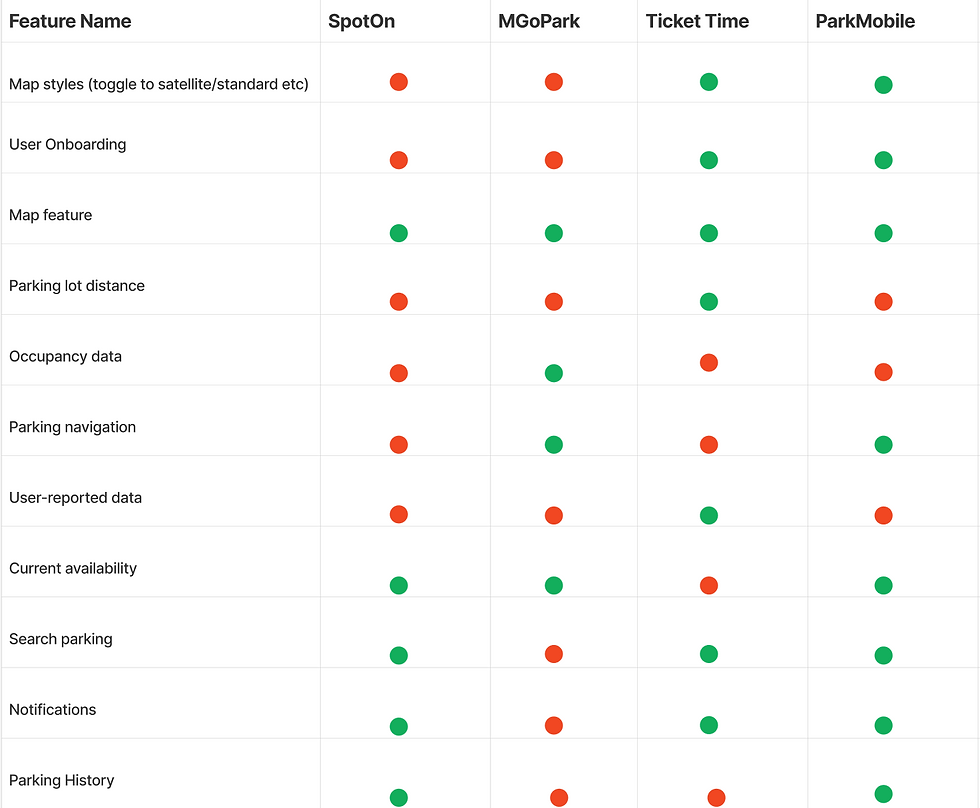
Of researched competitors...
75%
Do not offer a navigation feature.
75%
Offer real-time availability.
25%
Collect and display user-reported data.
Let's sketch!
Low-Fi Wireframes
To kick off our design process, my team began by individually creating low-fidelity wireframes, each outlining our vision for the app’s functionality and key features.

Med-Fi Wireframes
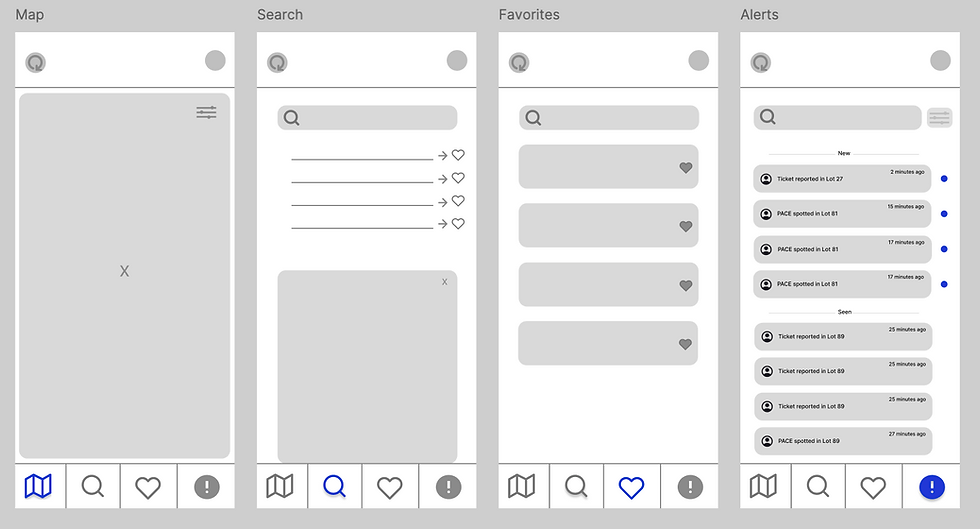
Once we were satisfied with the low-fidelity wireframes, we used Figma to turn our sketches into medium-fidelity wireframes to get a better understanding of the user experience and the information architecture.

High-Fi Wireframes


making it all come together
The Final Prototype
What did i learn?
Final Takeaways
Creating this project during SpartahackX was both a challenge, and one of the most rewarding design experiences I've had so far. While the tight deadline was our biggest hurdle, it reinforced my ability to perform under pressure and lead effectively in high stress situations.
Additionally, it was an opportunity to apply what I've learned through my coursework and follow a structured, user-centered design process, ensuring our solution was both useful and impactful.
Moving Forward
If we had more time, we would have liked to conduct user testing to gather feedback and refine our design based on real user needs. Additionally, we wanted to take the project a step further by coding a functional prototype, allowing us to test interactions and ensure a seamless user experience.